
How a Houston Restaurant Reduced Processing Costs by 38%
Restaurant owners are used to tight margins. Food costs fluctuate, labor costs rise, and software subscriptions quietly stack up month after month. What many owners don’t realize is that payment processing is often one of the most misunderstood and most overpaid expenses in their operation.
In this Merchant Chronicles case study, we break down how a Houston fast-casual pupuseria reduced their processing costs by 38% without changing how their restaurant runs day-to-day.
No downtime.
No retraining staff.
No operational headaches.
Just a smarter setup.
The Business
Business Type: Fast-Casual Pupuseria and Panaderia
Location: Houston, Texas 77070
Monthly Card Volume: $45,000
Previous Setup: Clover POS, Square processing, and separate FOX online ordering software
This business was passed down from father to son, and the son has been operating it since 2021. At first glance, nothing seemed wrong with the restaurant’s system. Everything worked. Orders were flowing, customers were paying, and the owner believed they were on competitive rates.
But once we reviewed their statement, the numbers told a different story.
The Problem
Like many restaurants, this business had unknowingly accumulated multiple systems and fees over time.
The owner believed their pricing was competitive, but their actual numbers revealed:
3.78% effective processing rate
Multiple monthly SaaS subscriptions
Separate online ordering platform
Long-term contract obligations
Limited transparency in their processing statements
Most owners never calculate their effective processing rate, so the true cost remains hidden inside dozens of line-item fees.
The result? Money leaking out of the business every month without a clear explanation. Cashflow not adding up after expenses taken out.
What We Found
Once we broke down the merchant statement and software stack, the numbers were clear.
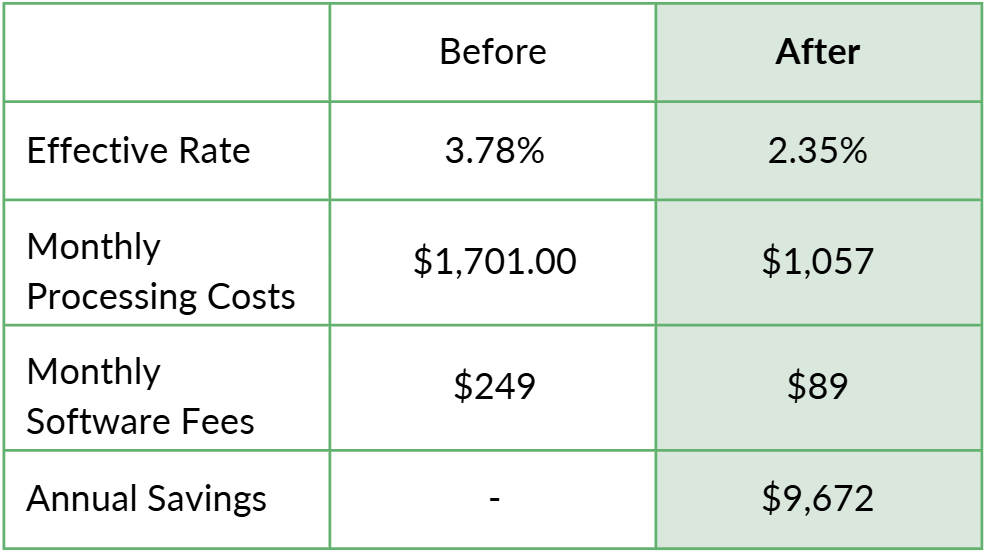
For a restaurant processing $45,000 per month, that difference is massive.
And it wasn’t caused by “negotiating harder.”
It was caused by fixing the structure of the system.
The Solution
Instead of layering more software or pushing gimmicky pricing models, we focused on simplifying the entire payment stack.
The changes included:
1. Switching to an Interchange Plus pricing model
This removed hidden processor padding that usually comes from a flat rate pricing model, and gave the restaurant transparent pricing tied directly to card network costs.
2. Consolidating software systems
POS, inventory management, and online ordering were unified into a single platform, eliminating unnecessary SaaS subscriptions.
3. Removing padded processor markups
A detailed statement audit exposed markups that had quietly accumulated over time.
Once those three issues were corrected, the restaurant immediately began operating with a much more efficient cost structure.
The Result
The restaurant now saves $806 per month.
That equals $9,672 per year back into the business.
Even more importantly, the transition caused zero operational disruption:
No downtime
No contract penalties
No staff retraining issues
From the team’s perspective, the system still works the same way.
From the owner’s perspective, thousands of dollars stopped disappearing every year.
What the Owner Said
"Lauren showed us exactly what we were paying for. We thought we had the best setup already. We had no idea we could save money and keep everything working the same way."
— Restaurant Owner, Houston TX
Why This Happens So Often
Most restaurant owners never see the full picture of their payment ecosystem.
Between POS providers, processors, software subscriptions, and online ordering platforms, it’s easy for costs to stack up quietly.
Sales reps come into the restaurants with predatory marketing tactics, convincing owners that their software is the only software that will make your business money. Of course, sales reps are often compensated across multiple layers of that stack, which means the “recommended setup” is not always the most efficient one.
The POS ecosystem of a restaurant should not be your business marketing strategy; it should aid you in achieving your business marketing strategy. There is not a miracle software that posts marketing content, drives sales up, and sorts your financial reports for your accountant. But there are systems that make it easier for you and your employees to do your job. This all comes from proper POS system matching, because as SaborPay always says: “POS systems are not a one-size-fits-all”.
The result of misinformed business owners and under-educated sales reps is what we see every day:
Businesses running three or four separate systems
Software subscriptions that duplicate functionality
Processing pricing structures that hide real costs
When those pieces are consolidated and priced transparently, the savings can be substantial.
Could Your Restaurant Be Overpaying?
If your restaurant processes cards, the fastest way to know is by reviewing your merchant statement and software stack.
You don’t need to change how your business runs. You just need to understand what you’re actually paying and see if anything can be consolidated.
A proper review can reveal:
Hidden processor markups
Inefficient pricing models
Redundant software subscriptions
Opportunities to consolidate systems
What is an effective processing rate?
Effective processing rate is the true percentage of revenue a business pays to accept credit and debit cards. It cuts through all the confusing line-item fees and tells you one simple number:
“Out of every dollar in card sales, how much went to payment processing?”
Most business owners think they are paying something like “2.6% + 10¢”, but their real effective rate is usually much higher once all fees are included.
The Formula
Effective Processing Rate = Total Processing Fees ÷ Total Card Sales
Then multiply by 100 to convert it to a percentage.
Example:
Monthly card sales: $45,000
Total processing fees: $1,701
Calculation:
$1,701 ÷ $45,000 = 0.0378
Effective Rate = 3.78%
That means: For every $100 the restaurant processed, $3.78 went to payment processing.
Quick Shortcut Method (What I Use When Auditing Statements)
Take the Total Fees from the statement.
Take the Total Volume processed.
Divide fees by volume.
Example:
Total Fees: $1,701
Total Volume: $45,000
Effective Rate: 3.78%
This takes 30 seconds and instantly reveals if a business is overpaying.
Request a Free Statement Review
If you want to see exactly where your processing fees are going, you can request a free merchant statement analysis.
Upload your statement and get a clear breakdown of:
Your true effective processing rate
What fees are unnecessary
Whether your system is set up efficiently
Your margins deserve transparency.